Extract Business Leads
from Google Maps

Get emails, phone numbers, addresses, websites, social media links, hours, and more from any area on the map. Grid-based search covers every business in your target zone.

Free to try — 10 exports per search. Unlimited with license.
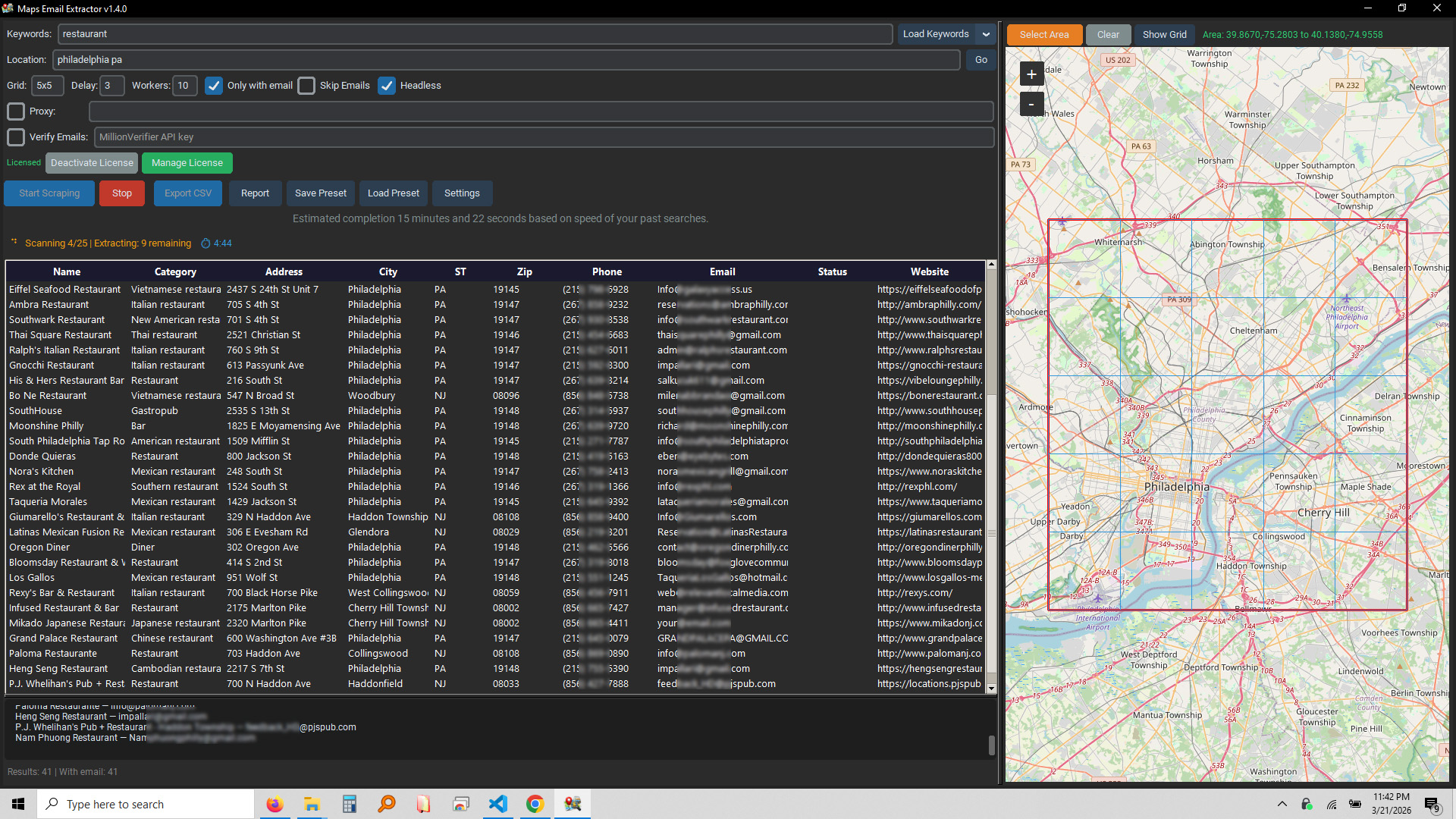
Maps Email Extractor Application
30+ Data Fields Extracted
100% Coverage with Grid Search
CSV Export Ready
10 Concurrent Workers

Everything You Need for Lead Generation

One tool to find, extract, and export business data from Google Maps

🌐

Grid-Based Area Search

Define any area on the map and the scraper divides it into a grid, scanning every tile to ensure no business is missed. Skip tiles you don't need with a right-click.

Email Extraction

Automatically visits each business website to find email addresses, checking homepages and contact pages. Extracts mailto links and inline email patterns.

📱

Complete Contact Data

Extracts name, category, full address, city, state, zip, phone number, website, email, ratings, reviews, and hours of operation for every business.

🔗

Social Media Links

Finds Facebook, Instagram, Twitter/X, LinkedIn, YouTube, Yelp, and Pinterest profiles from both Google Maps listings and business websites.

🔍

Multi-Keyword Search

Search for multiple business types at once — restaurants, salons, lawyers, and more. Organize keywords into groups for quick loading.

Email Verification

Built-in MillionVerifier integration to verify extracted emails in real-time. Know which leads have valid, catch-all, or invalid addresses.

🔒

Proxy Support

Rotate through proxies to avoid rate limits and access region-specific results. Supports HTTP/HTTPS proxy authentication.

💾

Session Resume

Long scan interrupted? The scraper auto-saves progress and can resume exactly where it left off. Never lose your work.

📈

Scan Reports

Generate detailed reports showing leads found per keyword, tile scan failures, run time, and scan progress for every search you run.

How It Works

Three simple steps to build your lead list

1

Select Your Area

Enter a location or draw a rectangle on the interactive map. Set your grid size and enter keywords for the types of businesses you want to find.

2

Start Scanning

Hit Start and the scraper works through every grid tile, scrolling through results and extracting listing details. Watch progress in real-time with the live log and results table.

3

Export Your Leads

When the scan is complete, export everything to a clean CSV file ready for your CRM, email campaigns, or outreach tools.

Data You Can Extract

Every field is extracted automatically and exported to CSV

Business Info

  • Business Name
  • Category
  • Rating
  • Review Count

Contact

  • Email Address
  • Phone Number
  • Website URL

Location

  • Street Address
  • City
  • State
  • ZIP Code

Social Media

  • Facebook
  • Instagram
  • Twitter / X
  • LinkedIn
  • YouTube
  • Yelp
  • Pinterest

Hours

  • Monday – Sunday
  • Open / Close times

Simple Pricing

Start free, upgrade when you're ready

Free

$0

forever

  • All features included
  • Grid-based area search
  • Email & social extraction
  • 10 exports per search
  • Session save & resume
Download Free

Download Maps Email Extractor

Desktop application for Windows and Mac

Maps Email Extractor v1.4.2

Free to try — 10 exports per search. Upgrade to Pro for unlimited access.

Frequently Asked Questions

Is this legal to use?

The scraper extracts publicly available information from Google Maps business listings and public business websites. Always comply with applicable laws and terms of service in your jurisdiction.

Do I need a Google account?

No. The scraper uses a browser to search Google Maps just like you would manually. No API key or Google account is required.

What happens if Google shows a captcha?

The scraper automatically detects captchas and resets the browser to get a fresh session. It tracks how many resets occur so you can monitor the process.

Can I run long scans overnight?

Yes. The scraper auto-saves progress continuously. If anything interrupts your scan, you can resume exactly where you left off. Scans of 8+ hours are common for large areas.

What format is the export?

All data exports to standard CSV format, compatible with Excel, Google Sheets, and any CRM or email marketing tool.

Can I use proxies?

Yes. The scraper supports HTTP/HTTPS proxies with authentication. This helps avoid rate limits and access region-specific results.

Contact Support

Have a question or need help? Send us a message.